Product & UX design · 9 years
I make complex software feel obvious.
To the people who use it all day — a live AI call console, a US government health service, operations across 1,000+ venues. I work where the workflow is dense and someone's whole working day depends on getting it right.

Rutuja Maind
Senior UX Designer
V2Solutions, Navi Mumbai
- FocusProduct & UX · enterprise, B2B, regulated
- DomainsFintech, healthcare, fitness, enterprise software (SaaS), edtech, real estate, travel
- AlsoBrand, campaign & motion
- BasedPanvel, Navi Mumbai (IST)
- Open toRemote worldwide · Mumbai / Navi Mumbai hybrid or on-site
- Tools and more
Open to senior, lead & staff roles
Product & UX case studies
Problem, solution, impact — three to four minutes each
Live & shipped
Six sites running right now — four I built end to end myself
- FRAME Reimbursement portal · Florida Dept. of Health Healthcare
- The Lab MontereyBuilt with AI Fitness & recovery studio Fitness
- FNS Training ClubBuilt with AI Personal training studio Fitness
- URBTSBuilt with AI Gym CRM & retention platform SaaS
- LoanGlide Point-of-sale consumer financing Fintech
- Jodhpur WalksBuilt with AI Heritage walking tours Travel
What I'm good at
- Enterprise & B2B product design
- Information architecture
- AI-assisted workflows
- Design systems
- WCAG accessibility
- Data-dense UI & dashboards
- User research
- Brand & campaign
- Motion & video
AI call centre platform · agent-facing application
The agent who couldn't look away
- Role I led the UX design and strategy
- Scope Research, wireframes, visual design, QA
- Team With product owners, development and QA
An agent is talking to a real person. Every second spent hunting across the screen is a second of silence the customer hears — so the interface has to do the remembering.
Context
The client builds AI-powered call centre software. Their agent-facing application had usability problems that were costing agents time during live calls, and they wanted four things: a better interface, a clearer information hierarchy, AI features that genuinely assist mid-call, and a navigation flow that lowers cognitive load rather than adding to it.
My users were call centre agents — people who need an interface that stays out of the way while they hold a conversation.
The problem
I audited the existing product and found five specific failures. Each one implied its own change, and that audit became the spine of the redesign.
Was
Live call details sat on the left, the actions that went with them top-right — agents kept re-connecting the two in their head while a customer waited.
Became
Related information grouped together, so reading and acting happen in one place.
Was
ACD status, interaction history and scripts all competed on the main screen, distracting from the task in hand.
Became
Essentials on the primary screen; everything non-critical collapsed until it is asked for.
Was
The AI was already completing the checklist, but the buttons looked manual — so agents ticked boxes the system had ticked.
Became
Actions redesigned to show what is automatic and where a human is genuinely needed.
Was
Revisiting a moment in the transcript meant scrolling back through the whole call.
Became
Clickable questions that jump to that point, plus keyword search across the transcript.
Was
Mixed fonts and colours with no shared logic, so nothing on screen carried reliable meaning.
Became
A style guide where colour is state: green qualified, red disqualified, grey pending, amber neutral.
Research
- Project owner interviews — to get at the real pain rather than the feature list. Delays in resolution and a complicated interface came up every time.
- Competitive analysis — reviewed call centre and AI-assisted tools across industries for patterns worth borrowing and traps worth avoiding.
- Persona development — built around a support agent whose entire measure of a good day is handling queries quickly without making mistakes.
The solution
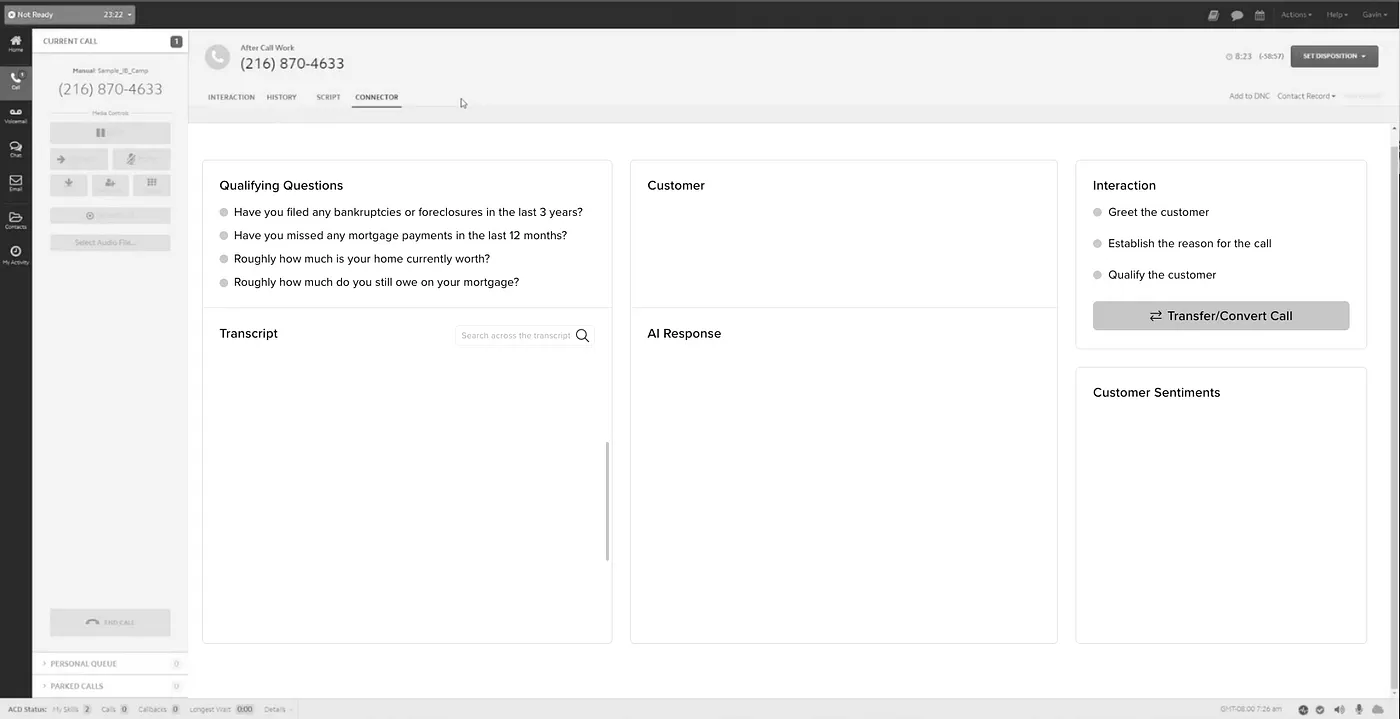
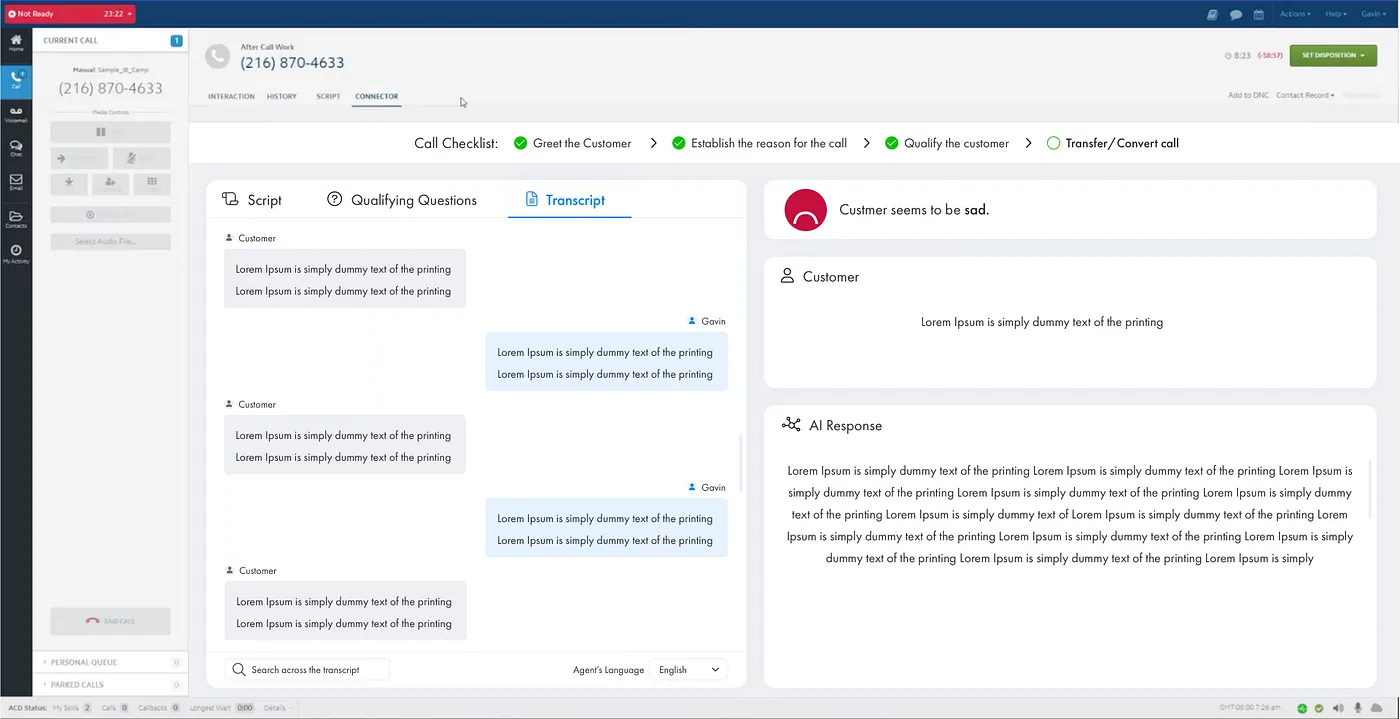
I wireframed the call as a sequence rather than a screen, because that is how an agent experiences it — a beginning, a middle and an end, each needing different things visible.
- Start of call — qualifying questions and the interaction flow, so the agent is ready to greet the customer and open the conversation.
- Mid-call — the AI detects greetings and marks them complete; predefined questions sit in grey, qualifying answers turn green and become clickable, disqualifying ones turn red.
- End of call — eligibility visible at a glance, with options to transfer, set a disposition or convert the lead.
- Sentiment and rebuttals — a real-time emotional read for the agent, with AI-suggested rebuttals and their success rates.
- Keyword search — find a term across the transcript instead of scrolling.
The client wanted dynamic scripts and live translation up front. I designed Phase 2 first, on paper, then cut Phase 1 out of it — so agents got relief sooner, and the later features landed in a structure already shaped to receive them. It reduced time and cost on both sides.
Impact
50% less handling time
Phase 1 shipped and agents handled more calls per shift.
- Lower operational cost and higher call capacity.
- The redesigned interface was sold on to other call centres as a product, opening a new revenue line for the business.
- Phase 2 — script automation, real-time translation via Azure Text to Speech, consolidated reassurance statements — slotted into the structure already built.
Phase 1 figure as recorded on the project. Happy to walk through how it was measured.
What I took from it
Designing for a high-pressure environment taught me that AI should support a decision without taking it over — the moment the interface hides what the machine did, the human stops trusting it. And that sequencing a release well is a design decision, not a project-management one.
Florida Department of Health · FRAME Program
Forty pages of policy, five real questions
- Role Senior UX Designer
- Duration 8 weeks
- Platform Responsive enterprise web portal
- Domain Government healthcare
- Live at fdohframe.com
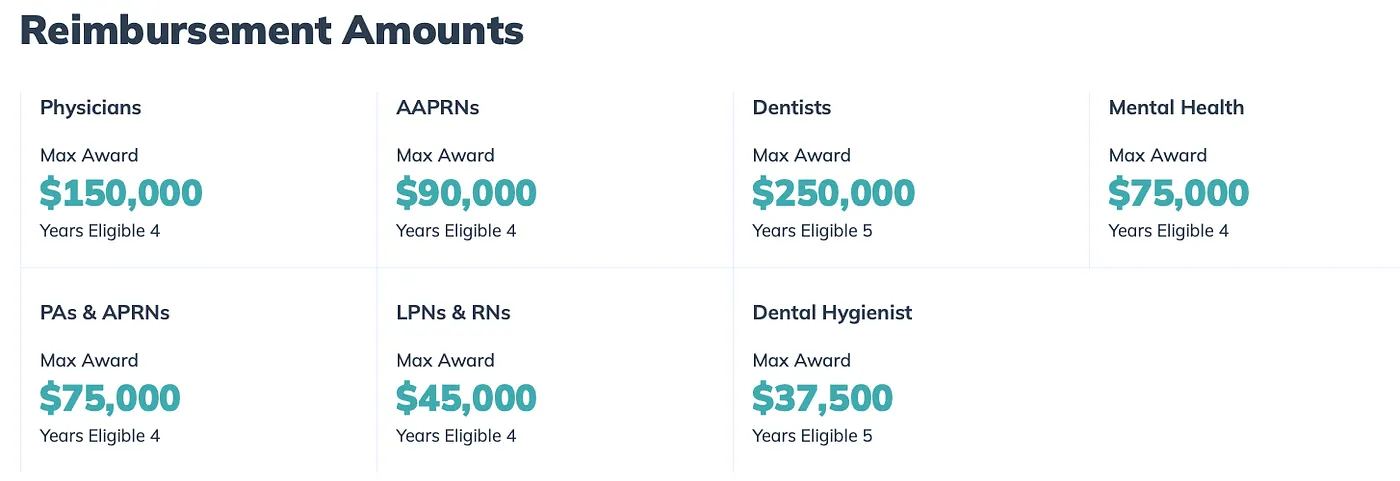
FRAME repays medical education costs for healthcare professionals who commit to serving communities with limited access to care. The people it exists for are busy — and the site asked them to read policy before it would say whether they qualified.
Context
The programme strengthens healthcare access in underserved communities by encouraging qualified professionals to practise where they are needed most. The digital experience had to increase awareness, simplify the application, improve discoverability, reduce confusion, and build trust — while staying compliant and transparent.
The problem
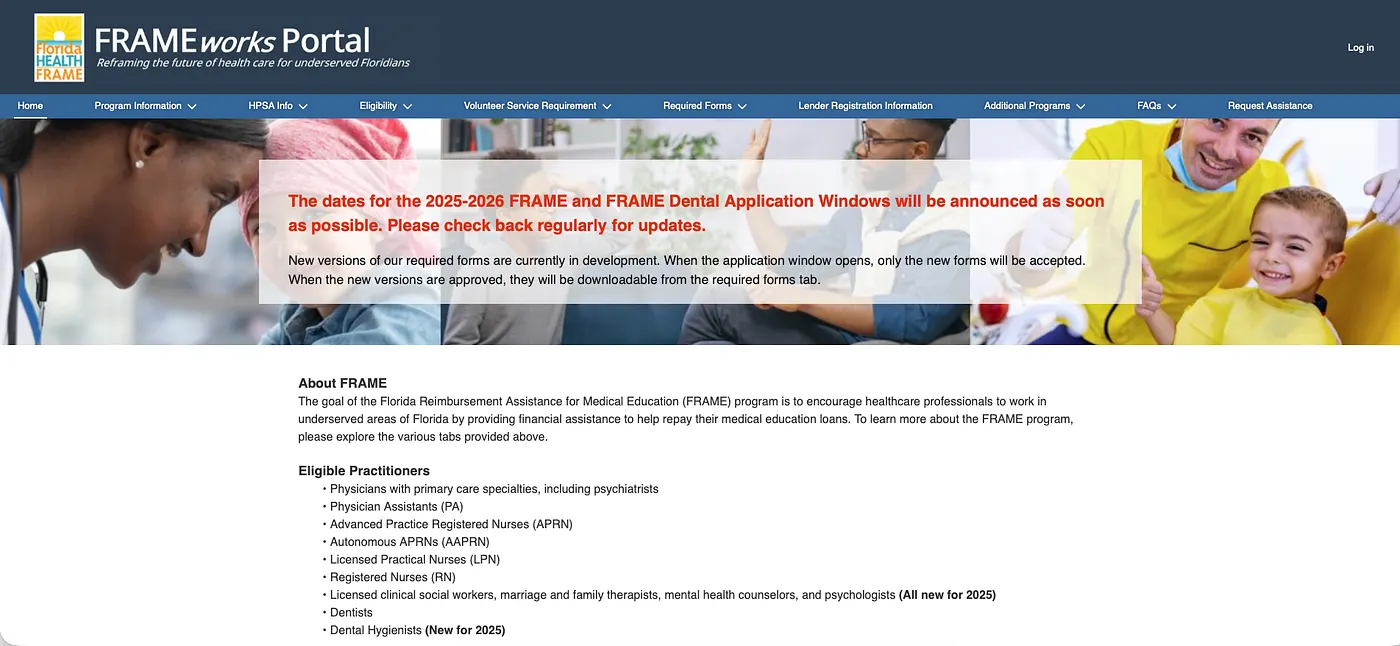
A clinician landing on that page had five questions and no patience: Am I eligible? What documents do I need? How do I apply? What are the requirements? What happens after I submit?
Every answer existed, several layers down, organised around the department that owned it rather than the person asking. Discovery — stakeholder workshops, a heuristic evaluation, government portal benchmarking, a content audit, an accessibility review and journey mapping — turned up five consistent problems:
- Information overload — applicants met large amounts of policy content before they could tell whether it applied to them.
- Complex navigation — the actions people came to perform sat beneath several layers of reading.
- Low confidence — with no clear guidance, people could not tell whether they were doing it right.
- Accessibility gaps — a public health service must work for a diverse audience on whatever device they have.
- Content organised around the org chart, not applicant goals, which added cognitive effort to every task.
The solution
Four principles governed every decision: make government services easy to understand without compromising policy accuracy; guide people step by step; build trust through clarity; and design for accessibility from the start.
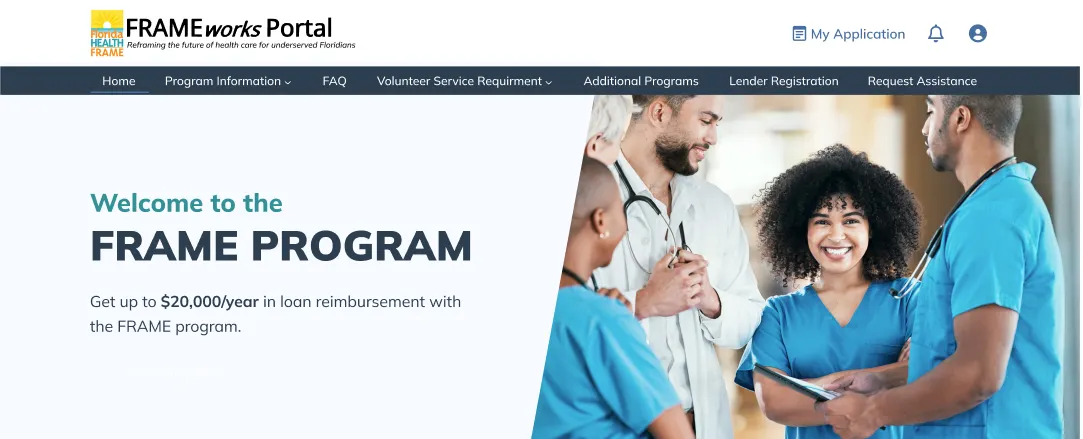
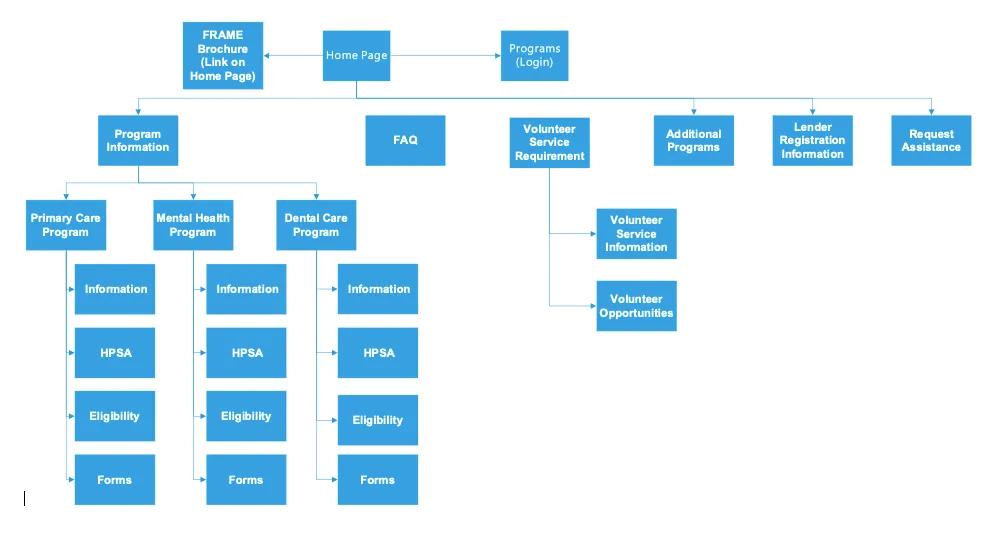
I rebuilt the information architecture around the five questions applicants actually ask, instead of around the department that owns each answer. Everything else followed from that one move.
- Applicant-centred architecture — eligibility, required documents, application steps, timelines and support resources, each findable in one step.
- Task-oriented navigation — structured around what people came to do, cutting unnecessary clicks.
- Progressive disclosure — typography, whitespace and visual grouping so complex information can be scanned before it is studied.
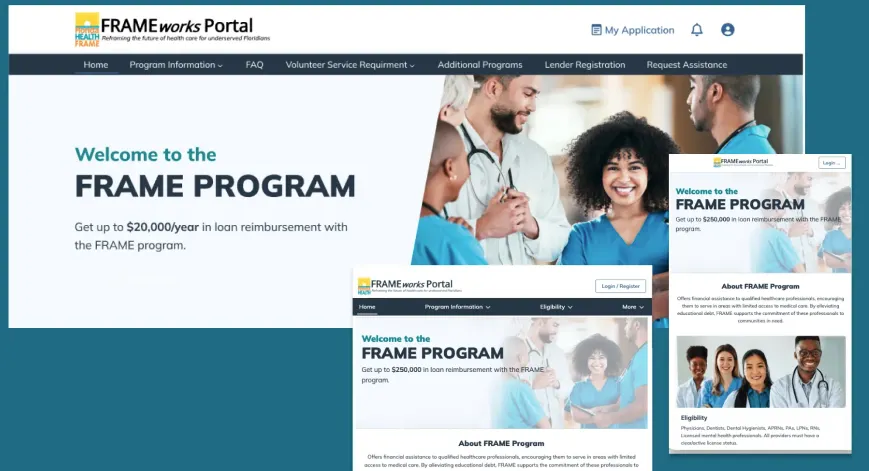
- Responsive across devices — a consistent experience on desktop, tablet and mobile, because applicants are rarely at a desk.
- Reusable design system — standardised components so future phases stay consistent and ship faster.
Accessibility
Accessibility was an input from the first wireframe rather than a compliance pass at the end: WCAG-compliant colour contrast, accessible typography and spacing, clear interactive states, consistent navigation patterns, a logical heading hierarchy, and responsive layouts throughout.
Impact
WCAG-aligned public service
The redesigned experience supports applicants and the department at the same time.
- Information is discoverable, and the application journey is simpler to finish.
- Applicant confidence is built through clarity rather than reassurance copy.
- A scalable design foundation and component library for future phases.
- Improved design consistency for the development teams building on it.
I have not been given post-launch completion figures for this programme, so I am not claiming any.
Gaming operator · 1,000+ venues, Australia
What the brief missed, the floor showed
- Role One of six designers — I owned the end-to-end journey and the design library
- Duration 6 months
- Tools Adobe XD, Sketch, Zeplin
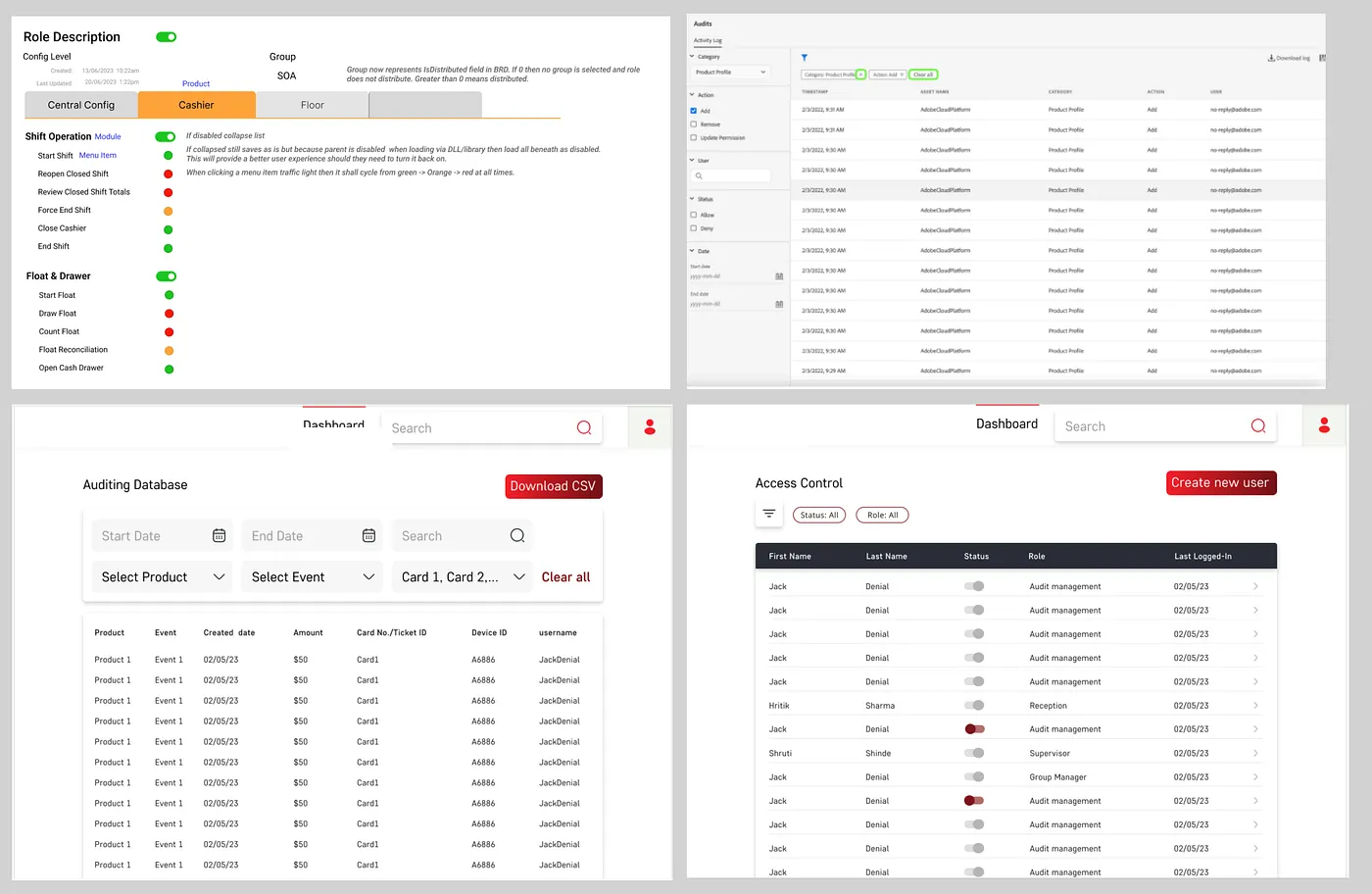
A single SuperAdmin was running user management, auditing and floor operations for more than a thousand venues on an offline system. The brief described the software. It did not describe the job.
Context
The client — a subsidiary of a financial technology group, founded in 2014 — had expanded fast across Australia, acquiring more than a thousand venues under licences in multiple states. Role-based responsibility had outgrown the way it was being tracked.
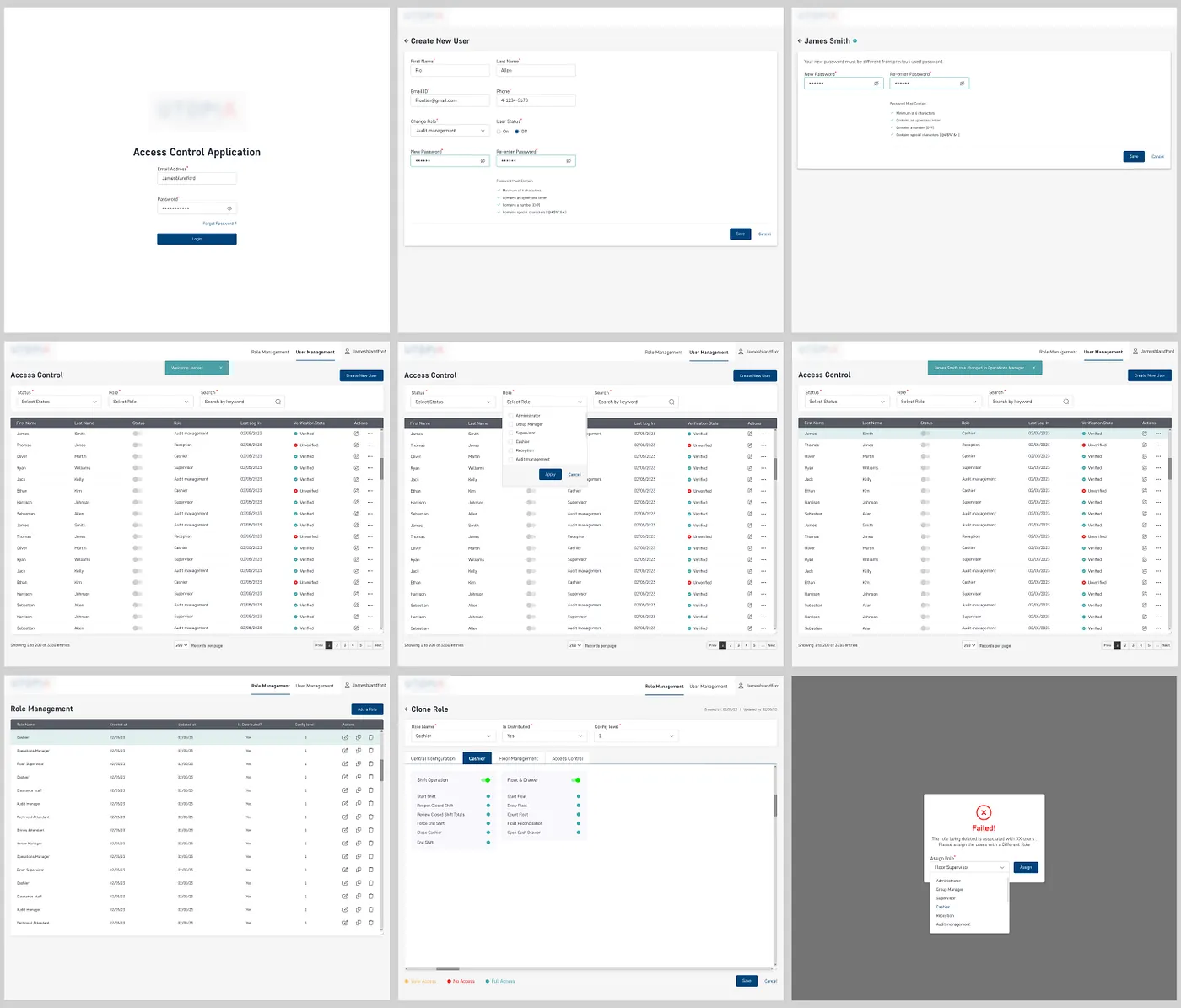
They needed one centralised platform covering user management, central configuration, gaming host and cashier applications, where the SuperAdmin could create and manage roles, delete users and update details, and assign role-based access control that held up to an audit.
The problem
Managing roles across User Management, Auditing and Floor Management offline had stopped being viable at that scale. But the written requirement described features, not friction — and nobody who wrote it had stood behind a counter during a shift.
We went to the venues and watched floor operations happen. That is where the real inefficiencies were — the ones the brief had missed entirely. I gathered the field insights and client requirements directly, and brought them back as the thing the design had to answer to.
The solution
With those insights we brainstormed around simplifying the role management workflow, then worked through multiple low-fidelity wireframes, each iteration driven by client feedback and internal review, before anything became visual.
Role management invites a permission matrix — technically honest, humanly unusable. So the interface is organised by what a person actually does, and the access model sits underneath it rather than on top of it. Each role reaches its own tools without meeting everybody else's.
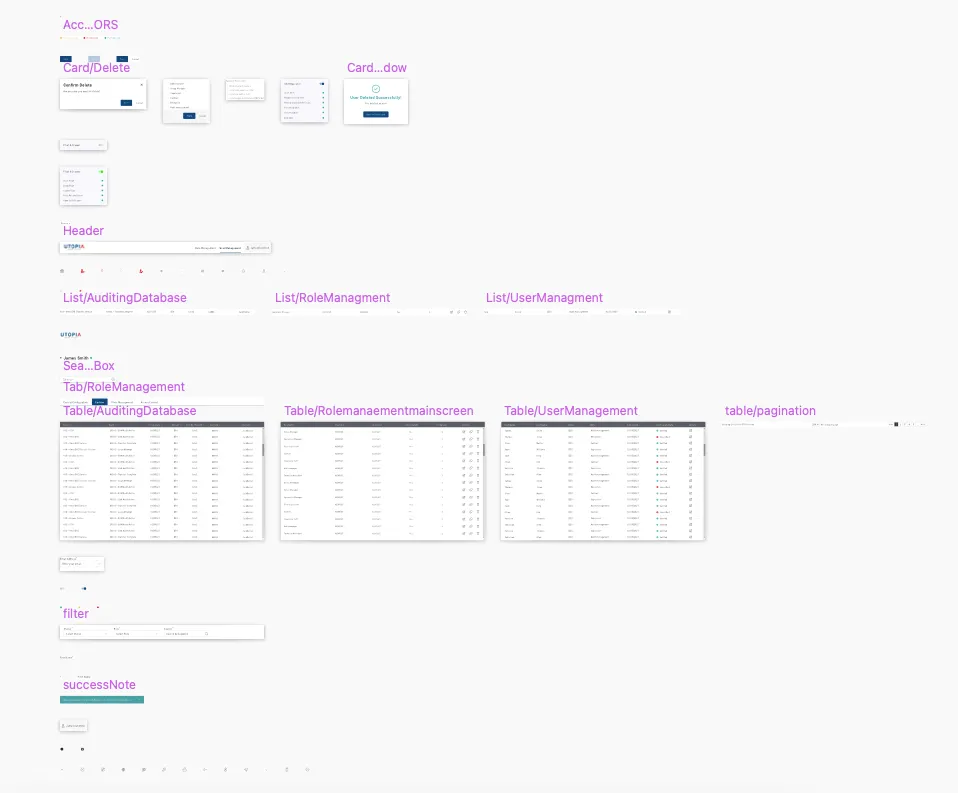
- A comprehensive design library — standardised UI elements, reusable components, typography and colour aligned to the client's brand. It is the reason six people could work in parallel without the product drifting, and it made future expansion straightforward.
- An interactive prototype simulating the core workflows, so stakeholders could experience the platform before it was built and we could validate choices with real feedback rather than opinion.
Impact
1,000+ venues, one platform
The operation came online, with real-time control and configuration replacing the offline system.
- Efficiency — users, roles and permissions managed in one place instead of several tools.
- Security — role-based access means only authorised people can perform an action, which cuts human error as well as risk.
- Streamlined operations — floor management, cashier functions and configuration centralised and monitorable across every venue.
Client policy limits what of this process can be shown publicly; these screens are the cleared subset.
What I took from it
Field research is not a nice-to-have. Observing the work on site gave us a understanding of the system's shortcomings that no amount of requirement-gathering would have produced — and it is the reason the design solved the real job rather than the described one.
Graphic, brand & motion
Opens on Dribbble, Behance and YouTube
Nine years in agency and services work means the brand side isn't a sideline — identity, print, product marketing, social and motion. It's also why I can hand a developer something that holds together.
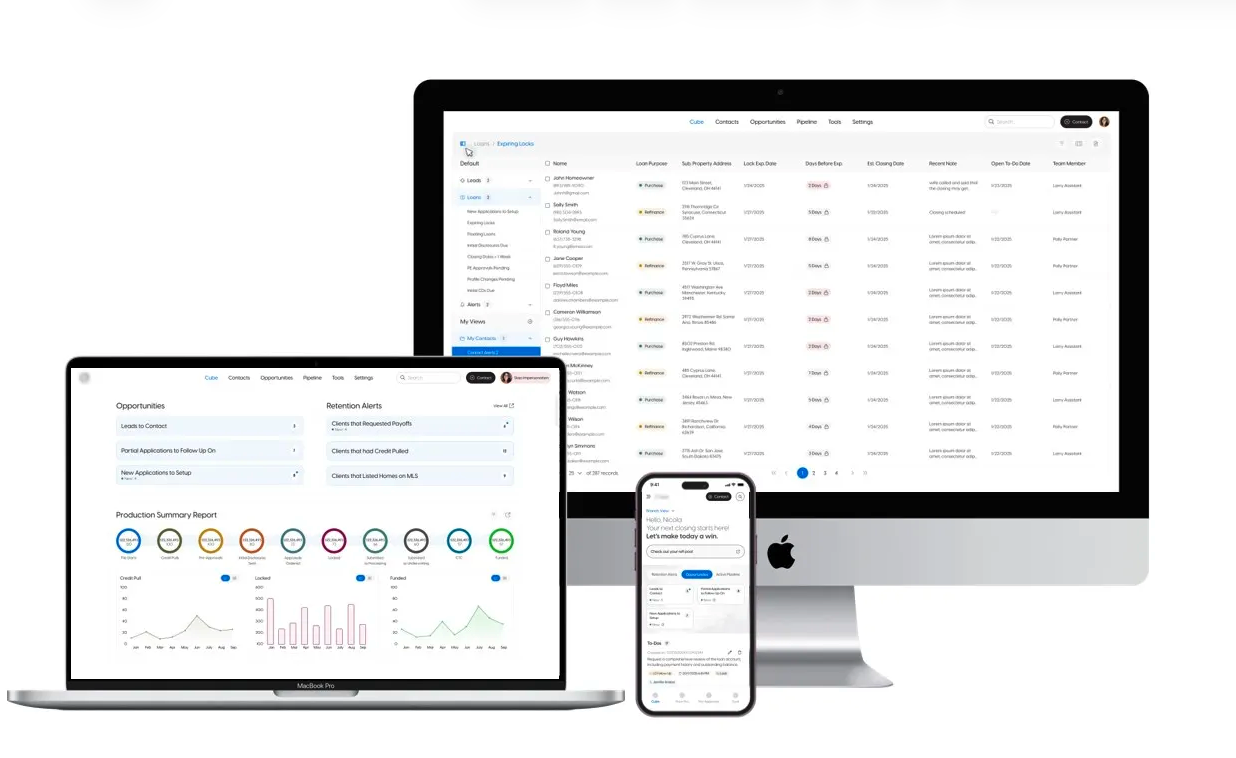
Mortgage Lender
Product UI · fintech View on Dribbble →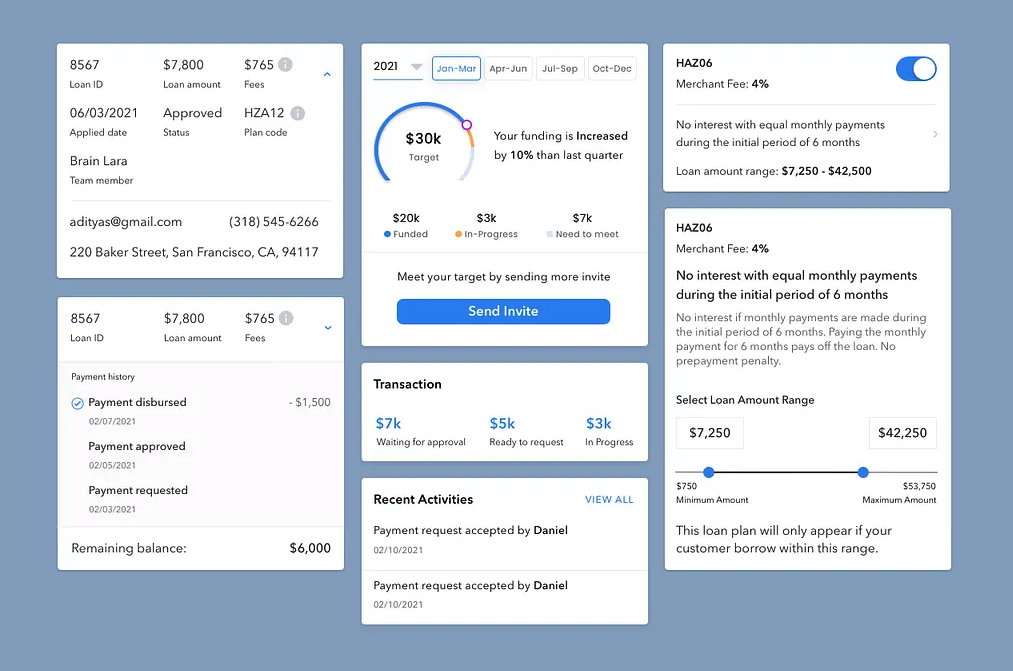
Info Card
Design system component View on Dribbble →
Kontengious
Logo concept · brand identity View on Behance →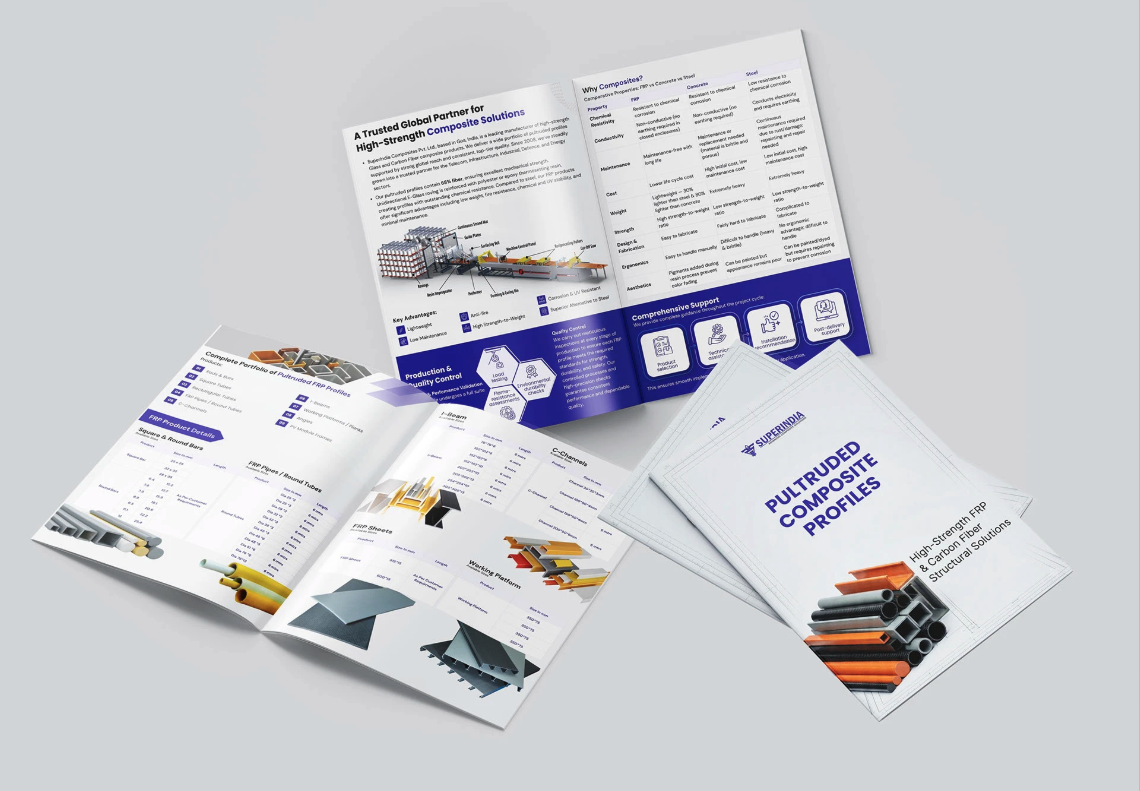
Product Catalogue
Print · layout & production View on Behance →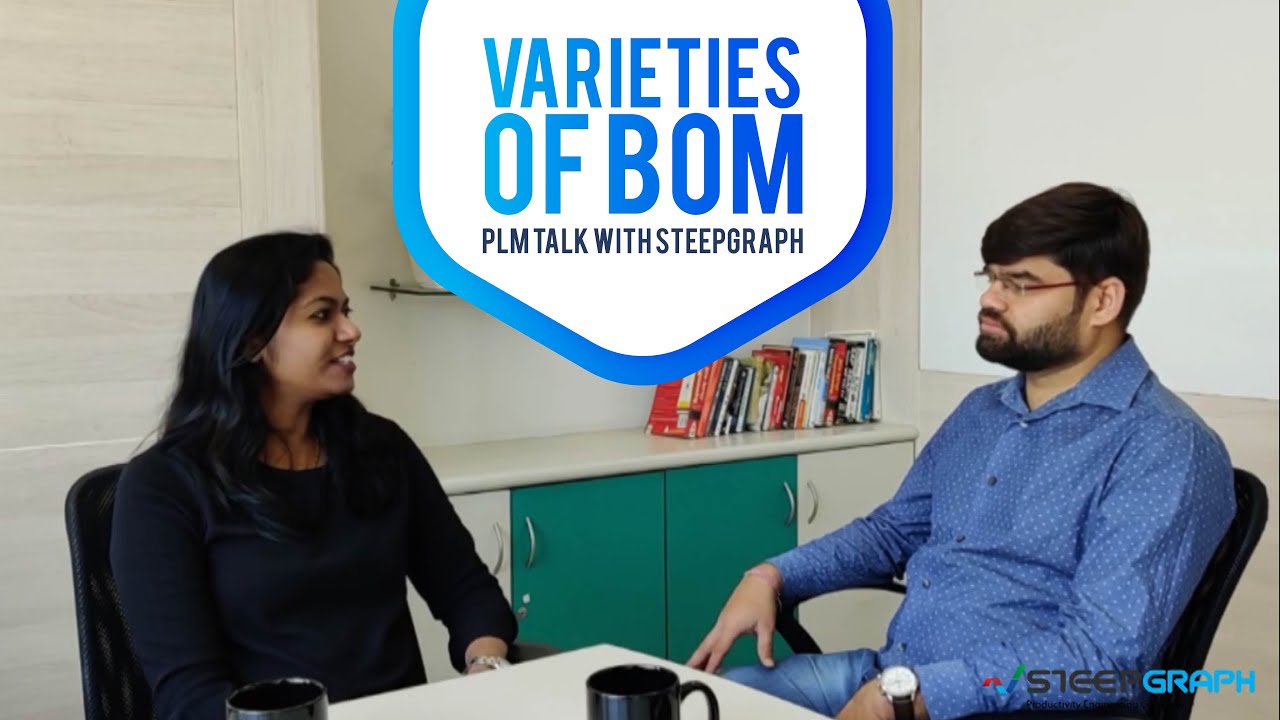
PLM Talk — explainer series
SteepGraph · edited end to end, motion graphics Watch on SteepGraph's channel →
More creative work
Emailers, social, presentations, print, video Open the folder →Motion & video
Where the edits are published
Motion isn't what I want to be hired for, but I do it properly. Some runs on channels I cut myself; the rest sits on client accounts rather than mine.
Channels I edit
Client accounts carrying my edits
About
Nine years, mostly enterprise
I'm a product and UX designer working on enterprise software — healthcare, fintech, government services, gaming operations. The common thread is complexity somebody has to live with every day, and my job is to make that day easier.
I start where it's ambiguous, because that's where the design decisions actually are. I'd rather go and watch the work happen than argue about a requirements document. I build the system underneath so the next person is faster, not just the current screen. And I stay hands-on through delivery — I'm not looking for a role where I stop making things.
Day to day I art-direct two or three designers, run critique and review work before it ships. Formal line management isn't something I've done, and I'd rather say that now than in round three.
Before the product work, nine years of agency and services experience across brand, campaign, print and motion — which is why I'm comfortable owning something from positioning through to the last asset.
Roles I'm looking for
Senior, lead or mid-level roles across graphic design, UI/UX and product design — in a team that takes craft seriously.
Where
Permanent, full-time. Fully remote worldwide, or hybrid and on-site in Mumbai / Navi Mumbai. Based in Panvel. Available immediately — 15 to 30 days.
Clients
- Florida Department of Health
- CrossCountry Mortgage · LoanGlide
- FNS360 · Lumina Datamatics
- SteepGraph · UTOPIA Gaming
- The Lab Monterey
Credentials
- UX, Accessibility in Design & Mobile App Design — Interaction Design Foundation, 2024
- Diploma, 3D Animation & Graphic Design — Kohinoor Technical Institute
- VFX Pro — Arena Animation
Find me
Profiles and long-form writing
Get in touch
Usually reply the same day
rutuja.maind06@gmail.com